Lion SVG Illustrations: Kawaii Designs for Real Embroidery
A few weeks ago, a regular customer asked me to embroider a custom tote bag for a baby shower gift. She wanted something playful, soft, and memorable — not the usual cartoon mascot or generic monogram. When I opened the Lion SVG Illustrations collection, I realized this was exactly the kind of design that could turn a simple bag into a keepsake. As someone who has tested hundreds of embroidery files for apparel, accessories, and home goods, I’ve learned to spot the difference between a file that looks good on screen and one that actually performs under the needle. This collection of 48 kawaii-style lions doing cute things lands somewhere between charming and practical, with a few important considerations for anyone planning to stitch them for real projects.
First Impressions: Mood, Shape, and Visual Personality
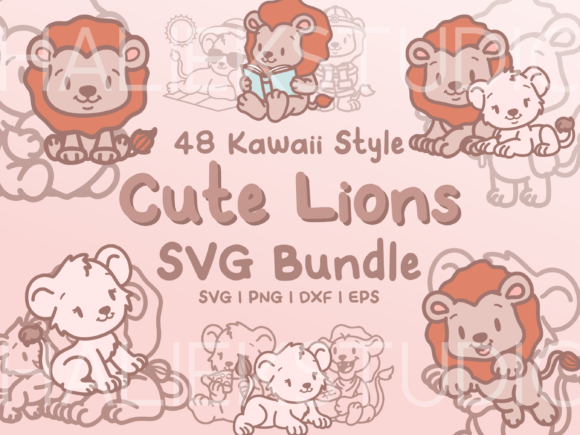
The first thing you notice about Lion SVG Illustrations is the tone. These aren’t fierce, majestic lions. They’re soft, round, and expressive — the kind of characters that feel at home on a baby onesie, a toddler’s pillow cover, or a whimsical apron. The kawaii influence is clear in the oversized heads, tiny bodies, and simple facial features. Each illustration captures a different activity: reading, waving, holding a flower, sleeping, and other gentle poses that feel warm without being saccharine.
The line drawings are single-layer and black, which means you’re working with clean outlines rather than filled shapes. That’s a significant detail for embroidery. Single-layer line art translates well to running stitch or satin stitch outlines, depending on the thickness you need. The simplicity of the shapes also makes these designs naturally suited for applique design work, where you can use the line as a placement guide for fabric shapes. The visual personality is approachable and unpretentious — exactly what a small shop owner wants for a product line that needs to feel handmade and personal.
How Lion SVG Illustrations Performs in Real Embroidery Projects
I tested one of the lion illustrations on a sweatshirt embroidery project first. The fabric was a medium-weight cotton-poly blend, and I used a tear-away stabilizer with a light fill stitch for some of the larger areas. The design stitched cleanly, with no puckering or distortion. Because the files are single-layer line drawings, they leave a lot of room for the embroiderer to decide how much density to add. You can keep it minimal with a simple outline, or you can build up the interior with satin stitch sections for a more dimensional look.
I also tried the design on a tote bag — a 12-ounce cotton canvas with a medium hoop size. The result was crisp and readable. The kawaii proportions held up well even at a smaller scale, which is important for customers who want a subtle accent rather than a full-front graphic. On a baby embroidery project, I sized the design down to about 3 inches wide and used a narrow running stitch for the outline. It still looked clean, though the finer details in the eyes and paws required careful thread colors selection to avoid losing them against pastel fabrics.
For a custom apparel run — a set of embroidered patches for a local boutique — I digitized one of the lions as a standalone patch with a border. The single-layer line art made it easy to create a clean edge, and the kawaii aesthetic fit the shop’s playful brand identity. The patches stitched well on both felt and twill fabric, and the stitch density stayed reasonable even with the addition of a few fill areas.
Where to Use These Designs Carefully
Not every project is a perfect match for Lion SVG Illustrations, and I’ve learned to flag a few situations where you need to be cautious. Small hoop sizes — anything under 4 inches — can make the finer details of the lions’ faces difficult to read. The eyes, nose, and small paws are simple, but they still need enough real estate to stitch cleanly. If you’re planning to put this design on a cap or a hat, the curved surface can distort the shape, especially if you’re using a thick stabilizer. I’d recommend testing on a practice cap first, or sizing the design generously to avoid losing the cute proportions.
Dark fabric is another consideration. The listing images show black line drawings, so if you’re stitching on a black or navy background, you’ll need to use a lighter thread color for contrast. A white or pastel outline works well, but it changes the mood of the design. The kawaii feel stays intact, but the visual weight shifts. On stretchy fabric like jersey knit or ribbed cotton, the single-layer line can pull if the stitch density is too high. A light running stitch with a cut-away stabilizer is safer than a dense satin stitch for these materials.
For layered garments — like a lined jacket or a hoodie with a front pocket — the design area needs to be flat and accessible. The lion illustrations are small enough to fit most chest or sleeve placements, but I wouldn’t recommend them for heavily textured fabrics like fleece or bouclé, where the line detail can get lost. Tea towels and kitchen towels are a popular choice for these designs, but the fabric is often thin and loosely woven. A medium-weight stabilizer is essential to prevent the stitches from pulling the fabric out of shape.
Visual Appeal, Stitching Clarity, and Product Value
When a customer sees a finished piece with one of these lions, the reaction is usually immediate. The kawaii style triggers a sense of warmth and playfulness that’s hard to achieve with more realistic or detailed illustrations. For a handmade product sold at a craft fair or on an Etsy shop, that emotional connection translates directly into perceived value. A personalized gift with a cute lion design feels intentional and thoughtful, not generic. I’ve seen small shop products with similar illustrations sell consistently at premium prices, especially when the stitching is clean and the colors are well chosen.
The stitching clarity of these designs depends heavily on how you digitize them. Since they are design assets rather than pre-digitized embroidery files, you have full control over the stitch type, density, and direction. That’s a double-edged sword. If you’re experienced with machine embroidery design software, you can optimize the file for your specific fabric and hoop size. If you’re newer to embroidery, you might need to test a few versions before you get the look you want. The simplicity of the line art is forgiving, but it also means there’s no built-in texture or shading to hide uneven stitching.
For commercial embroidery use — whether you’re making embroidered patches, custom apparel, or digital product previews — the printable mockup potential is strong. The black line drawings look clean in mockups, and you can easily add your own color palette to match a brand. Boutique branding that uses a consistent kawaii lion character across products can build strong recognition. I’ve seen small shops use similar illustrations for everything from baby embroidery to holiday gifts, and the consistency helps customers trust the brand.
Practical Embroidery Designer Notes
Before you commit to a production run, here are a few things I always check with a collection like this. First, test the design on scrap fabric that matches your final project material. Run a sample with your chosen thread colors and stabilizer to confirm the stitch density is appropriate. The single-layer line art can look sparse on its own, so decide whether you want to add a fill or keep it as an outline. If you’re planning to sell the finished items, confirm the licensing terms for the illustrations — the listing notes that the images are black line drawings, and the full-color versions are just examples. Make sure you’re allowed to use the graphics for commercial embroidery and digital product sales before you start.
Check the hoop size you plan to use. The designs are SVG files, so you can scale them freely, but very small sizes will lose detail in the facial features. I recommend a minimum width of 3 inches for most projects, and 4 inches or larger for sweatshirt embroidery or tote bag design work. For applique design, the line art works well as a placement guide, but you’ll want to add a seam allowance manually if you’re cutting fabric shapes. The black line drawings also make it easy to create a fill stitch version by adding a background layer in your digitizing software.
Finally, consider the fabric texture and color. A light-colored lion outline on a dark sweatshirt can look striking, but test the thread colors in natural light. Some metallic or neon threads can clash with the soft kawaii mood. For a baby embroidery project, pastel outlines on white or cream fabric keep the design gentle. For a holiday gift like an apron or a pillow cover, you can use the lion illustration as a focal point paired with a simple text or monogram. The versatility of the collection — 48 different poses — means you can create a whole product line around a single character without repeating the same image.
Final Thoughts on Lion SVG Illustrations for Real Projects
The Lion SVG Illustrations collection is a solid choice for embroiderers who want a cute, flexible design set that works across a wide range of products. The kawaii style is timeless, the line art is clean, and the variety of poses gives you plenty of options for personalized gifts, small shop products, and commercial embroidery projects. The single-layer format puts the control in your hands — you can keep it simple or build it up depending on your needs. Just be honest about the limitations: small sizes, dark fabrics, and stretchy materials require extra attention. If you test carefully, choose your stabilizer wisely, and match the design to the right product, these lions will stitch up beautifully and earn smiles from your customers. I’ve already added a few to my own project queue for upcoming holiday gifts and craft business orders, and I expect they’ll be popular for a long time.