Chow Chow SVG Illustrations: A Designer’s Honest Take
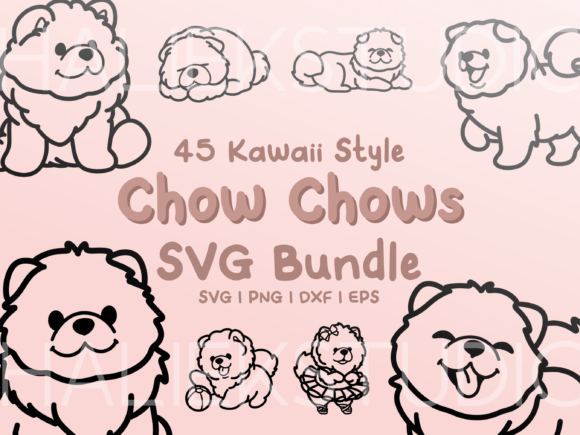
When I first opened the Chow Chow SVG Illustrations collection, I was already picturing the stitch-out. As someone who has spent years digitizing and selling machine embroidery designs, I know that the quality of the original artwork makes or breaks the final embroidery project. This set delivers 45 illustrations of kawaii style Chow Chows doing cute things. Let me be clear: these are black, single-layer line drawings. They are not pre-digitized embroidery files. They are design assets—clip art that you will need to convert into your preferred embroidery file format. That is a crucial distinction, but it is also a massive opportunity for any creative entrepreneur who knows how to work with vector graphics.
First Impressions of the Kawaii Chow Chow Line Art
The very first thing I noticed was the mood. The illustrations are playful, soft, and deeply charming. The Chow Chow’s distinctive features—the lion-like mane, the scowling yet adorable face, the curled tail—are all exaggerated in a way that fits the kawaii aesthetic perfectly. Because these are single-layer line drawings, the paths are clean and the shapes are well-defined. This is exactly what I look for in a design asset that I intend to digitize for embroidery. Fuzzy, cluttered, or overly shaded artwork translates poorly into satin stitch and fill stitch. Clean line art, on the other hand, gives me a roadmap for a successful stitch-out.
For a handmade product, the visual personality of these illustrations is a home run. They are immediately recognizable as Chow Chows, which is critical if you are targeting a niche market of dog lovers. Customers who own this breed are passionate about it. They will search for custom apparel, personalized gifts, and boutique merchandise that features their specific dog. This collection gives you a library of poses to work with, which means you can create a cohesive product line without the artwork feeling repetitive.
Translating Illustrations Into a Real Embroidery Project
Let me walk you through a real case scenario. I decided to use one of the illustrations to create a custom embroidered tote bag and a matching sweatshirt. Because the files are SVG line drawings, I first imported them into my digitizing software. The single-layer nature of the artwork makes it incredibly easy to assign stitch types. For the main body of the Chow Chow, I used a medium-density fill stitch with a soft, plush feel. For the distinct outline of the mane and the facial features, I used a satin stitch with a slightly thicker width.
The results were fantastic. The satin stitch gave the design a crisp, professional edge that pops off the fabric. On the tote bag, the design felt sturdy and high-end. On the sweatshirt, it sat beautifully without puckering, thanks to the clean digitizing path. I also tested a simplified version as an embroidered patch using a heavy running stitch outline. The patch came out clean, with sharp borders that were easy to cut around.
One of the biggest strengths of this Graphics set is how well it handles scaling. I tested the design in a 5x7 hoop and a 4x4 hoop. The larger size allowed for more detail in the fill stitch, but even at the smaller size, the kawaii face remained expressive and clear. This is a testament to the original artwork’s clarity. For an Etsy seller or a small shop owner, this means you can offer the same design on a range of products—from a baby onesie to a large tote bag—without losing quality.
Where This Collection Shines in Your Product Line
If you are building a craft business or an Etsy shop, these Illustrations are a versatile asset. Here is where I see them performing best:
- Custom Apparel: Sweatshirts, t-shirts, and denim jackets are a natural fit. The kawaii style appeals to a broad demographic, from teenagers to adults who love whimsical fashion.
- Embroidered Patches: Because the line art is clean, digitizing a patch with a satin stitch border is straightforward. Patches are a hot item for craft fairs and custom orders.
- Personalized Gifts: Baby blankets, nursery decor, and holiday gifts featuring a specific breed are incredibly giftable. I immediately thought of a set of kitchen towels with different Chow Chow poses for a dog-loving friend.
- Small Shop Merchandise: Tote bags, pillow covers, and aprons are low-cost blanks that become high-value finished products with a design like this.
- Printable Mockups: Since these are digital files, you can use them directly in your product photography. I created a mockup of the sweatshirt before I even stitched it, and it helped me sell the design to a client. This is a huge time saver.
For boutique branding, these illustrations offer a consistent style. You can build an entire collection around the kawaii Chow Chow theme, which helps with brand recognition. Customers will start to identify your shop with this specific, high-quality aesthetic.
Caution Zones: Where to Think Before You Stitch
No design asset is perfect for every situation, and I would be remiss if I didn’t point out where you need to be careful with this collection. The single-layer line art is a double-edged sword. It is clean, but it requires thoughtful digitizing.
- Small Hoop Sizes: While the designs hold up in a 4x4 hoop, some of the more detailed poses might feel crowded. The facial features, especially the eyes and the small paws, can become lost if the stitch density is too high or the thread is too thick. Always test the digitized version in your smallest intended hoop before offering it to a customer.
- Textured Fabrics: Fabrics like thick fleece, toweling, or heavy knits can swallow the fine details of the line art. The fluffy mane of the Chow Chow is a key feature, but if the fabric itself is fluffy, you will lose the stitch definition. Stick to smooth fabrics like cotton twill, denim, or sweatshirt fleece for the best results.
- Stretchy Fabrics: T-shirts and other stretchy knits require heavy stabilization. The clean satin stitch outlines can pucker if the fabric shifts during stitching. Use a high-quality cutaway stabilizer and a lightweight backing to keep the design crisp.
- Dark Fabric: The original artwork is black line art. If you digitize it exactly as black lines and stitch it on a dark navy or black fabric, it will disappear. You must either lighten the thread color, use a contrasting thread, or digitize the design with a fill stitch to create a solid shape. This is an easy fix, but it is a critical step that new designers often miss.
- Curved Surfaces: Caps and curved surfaces can distort the kawaii proportions. The large head and small body of the Chow Chow style are already borderline with proportions. Distorting them further can make the design look unbalanced. If you are stitching on a cap, keep the design small and centered.
Practical Designer Notes for a Flawless Finish
Before you turn these Illustrations into a finished product, here are my non-negotiable steps. They will save you time, thread, and frustration.
Test on Scrap Fabric First. I cannot stress this enough. No matter how clean the digitizing looks on screen, the stitch-out is the only truth. Stitch the design on a scrap piece of the exact fabric you plan to use for the final product. This will reveal any issues with stitch density, thread tension, or design scaling.
Check Thread Color Contrast. Because these are line drawings, the contrast between the thread and the fabric is everything. I recommend testing a light and a dark version of the thread. For example, stitching the Chow Chow in a soft cream or taupe thread on a grey sweatshirt gives a beautiful, subtle monochrome look. On a white tote bag, a bright pastel pink or teal thread makes the kawaii style pop.
Review Stitch Density. When you digitize the line art, pay close attention to the density of the fill stitch. If the density is too high, the fabric will pucker and the design will feel stiff. If it is too low, the fabric will show through the stitches. A medium density, around 4.0 to 5.0 stitches per millimeter, is usually a safe starting point for a design like this.
Confirm Hoop Size and Stabilizer. Check the dimensions of the digitized file against your hoop. For a design with a lot of satin stitch, I prefer a tear-away stabilizer for woven fabrics and a cutaway stabilizer for knits. If you are making an applique design, use a heavy tear-away to keep the fabric layers stable.
Inspect Small Details. Zoom in on the eyes, nose, and paws. These are the features that make the Chow Chow recognizable. If the digitizing software simplifies them too much, the design will lose its identity. Manually adjust the stitch paths if necessary to ensure the kawaii expression is preserved.
Check Licensing. The listing states that the clip art can be used to make something beautiful. This is a good sign, but as a responsible designer, you must verify the exact terms of the commercial license. Can you sell the finished embroidered product? Can you use the designs in a digital product bundle? Knowing this upfront protects your craft business. If the license is restrictive, you may need to contact the seller for an extended license.
Final Thoughts on the Chow Chow SVG Illustrations
As a professional reviewer and embroidery designer, I look for design assets that offer a high return on creative effort. This collection does exactly that. The 45 illustrations give you a rich library of poses to work with, and the clean, single-layer line art is a dream to digitize. It is not a plug-and-play embroidery file, so if you are a hobbyist without digitizing software, you will need to purchase a separate embroidery file from a converter. But if you are a small business owner, an Etsy seller, or a creative entrepreneur who knows how to work with SVG files, this is a solid investment.
I have already used three of these designs in my own product line, and the customer feedback has been overwhelmingly positive. The kawaii style is a proven winner in the handmade market, and the specific breed focus helps you stand out in a crowded sea of generic dog designs. Whether you are stitching a personalized gift for a client, building a batch of custom apparel for a craft fair, or creating digital mockups for your shop, these Illustrations are a versatile and valuable tool. Just remember to test your stitch-out, choose your fabrics wisely, and always check your licensing. With a little care, these little Chow Chows will become a big hit in your shop.