Tree Brush Illustrations: Spooky Graphics for Designers
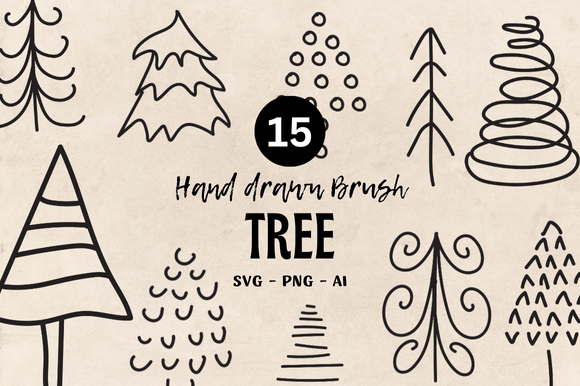
As a designer who regularly sources creative assets for real client projects, I’m always looking for graphic design elements that bring a specific mood without sacrificing versatility. Tree Brush Illustrations caught my attention immediately because it delivers a raw, hand-drawn feel that’s perfect for seasonal campaigns, handmade brands, and anything with a darker, atmospheric edge. The set includes 15 high-resolution PNG files at 300 DPI, 15 scalable SVG files, and one AI file, making it compatible with everything from Adobe Illustrator to Canva, Cricut Design Space, and even print-on-demand platforms. This is not just another clipart pack—it’s a carefully curated collection of tree illustrations that feel expressive, slightly eerie, and deeply organic.
A Mood That Instantly Sets the Tone
The first thing I noticed about Tree Brush Illustrations is the texture. Each tree appears to be drawn with a brush that has a lot of personality—think ink bleeding into paper, irregular lines, and shapes that feel alive. The style leans into horror, Halloween, and spooky themes without being cartoonish or overly cutesy. These are trees you’d expect to see in a foggy forest, a haunted storybook, or a moody editorial layout. The black-and-white contrast is strong, which gives the illustrations a timeless quality. For a designer working on a boutique brand identity, a seasonal logo, or a set of marketing visuals for a small business, this asset can instantly communicate a haunting, natural, or mystical vibe. The file format selection is practical: PNG for immediate use in mockups and social media, SVG for resizing in vector software, and AI for deep customization.
Real Client Project Scenario: A Halloween Product Line
Let me paint a realistic picture. I’m working with a client who runs a small handmade candle business. They want to launch a limited-edition autumn collection called “Witching Hour.” The packaging needs to feel premium yet rustic, with a touch of the supernatural. Tree Brush Illustrations becomes the visual anchor for the entire campaign. I use one of the larger tree vectors as a central motif on the front label, paired with a simple serif font for the brand name. The brush texture adds a tactile quality that echoes the client’s hand-poured candles. On the back label, a smaller tree illustration acts as a decorative divider between ingredients and scent notes. For the social media launch, I export the same tree from the PNG file and place it behind product photos in a dark, moody color palette. The result: a cohesive brand identity that feels intentional, not generic. The client’s customers immediately recognize the spooky, artisan feel.
Where Tree Brush Illustrations Shines in Design
This asset works best when you give it room to breathe. In large layout areas—hero graphics, poster backgrounds, or product mockup headers—the brush strokes create a dramatic focal point. I’ve used it in a flyer design for a local Halloween market, where a single large tree spanned the entire left column, with typography overlaid on a semi-transparent box. The texture didn’t fight the text; it enhanced the atmosphere. For packaging design, the PNG files with transparent backgrounds are a lifesaver. I can drop them into a Canva template for a sticker sheet or a mug design without dealing with messy backgrounds. The SVG format is perfect for sublimation printing on t-shirts, tote bags, and ceramic items because I can scale the tree to any size without losing line quality. For editorial design, such as a magazine spread about folklore or autumn traditions, the illustrations serve as chapter openers or pull-quote accents. The hand-drawn style adds an editorial, almost vintage feel that resonates with readers looking for authenticity.
Where Caution Is Needed: Small Sizes and Crowded Layouts
No design asset is perfect for every situation, and Tree Brush Illustrations has limitations. The brush texture that looks stunning at a large scale can become muddy or indistinct when reduced too much. In a small business card, for example, the intricate linework might lose detail, especially if printed on a rough paper stock. I recommend testing the illustrations at the actual size you intend to use. If the tree is meant to be a tiny icon on a website footer, it may not read clearly. Similarly, in crowded layouts with multiple elements, the organic shapes can clash with clean, geometric graphics. For minimalist branding or professional corporate materials, the spooky, hand-drawn style might feel out of place. I wouldn’t use this set for a finance company’s annual report or a healthcare clinic’s website. The visual hierarchy becomes confused when the illustration competes with too many other decorative elements. Always check contrast, especially on light backgrounds—the black lines are strong, but on a dark background, you may need to invert the PNG or use a lighter version of the SVG.
Readability, Hierarchy, and Emotional Appeal
When I place Tree Brush Illustrations into a layout, I immediately notice how it affects the overall hierarchy. The dark, expressive lines draw the eye first, so they work best as a secondary or tertiary element—not as the primary text vehicle. For readability, I avoid placing body text directly over the busiest parts of the tree. Instead, I position the illustration to one side or use it as a border accent. The emotional appeal is strong: the brush style evokes feelings of nostalgia, mystery, and a connection to nature. This is ideal for brands that want to project a handmade, artisanal, or even slightly rebellious personality. A small business selling herbal teas, a craft brewery with a seasonal stout, or an Etsy shop offering gothic home decor would all benefit from the visual trust this asset builds. The illustrations feel genuine, not mass-produced, which is a huge advantage in a market saturated with clipart.
Practical Designer Notes Before You Commit
Before integrating Tree Brush Illustrations into a client project, I run a few checks. First, I test the black-and-white contrast by printing a sample at 300 DPI on standard paper. The PNG files hold up well, but I make sure the SVG lines are editable in my vector software. The AI file is a nice bonus, but I always double-check that the layers are named logically. For a Cricut project, I convert the SVG to a cut path and test it on a small vinyl decal—the tree shapes cut cleanly, but the thin branches require a steady material. I also preview the tree on both light and dark backgrounds to see if the brush strokes blend or disappear. In terms of font pairing, I’ve found that the illustrations work superbly with serif fonts (like Garamond or Playfair Display) for an elegant, old-world feel, and with handwritten fonts (like a messy script) for a raw, artistic look. They clash with very geometric sans-serif fonts like Helvetica Bold, unless the layout is intentionally chaotic. The commercial license is another critical point: I always confirm that the asset can be used for client work, especially for print-on-demand products like t-shirts or mugs, where the design is sold as part of a product. The product description mentions “Compatible with any software” and includes multiple formats, which suggests the creator intended it for broad commercial use, but I still read the full license terms on the marketplace.
Final Verdict: A Versatile Asset for the Right Project
Tree Brush Illustrations is a solid addition to any designer’s creative toolkit, especially if you work with Halloween, horror, autumn, or nature-themed projects. The combination of PNG and SVG formats makes it easy to use across web design, social media graphics, packaging design, and even printable designs like stickers and wall art. For a small business branding package, a seasonal campaign, or a handmade product line, the illustrations bring a level of texture and authenticity that stock photos often lack. Just be mindful of scale and layout density. If you’re a content creator, blogger, or digital seller looking for a graphic design asset that adds instant mood, this set delivers. The brush strokes are expressive, the mood is perfectly spooky, and the file flexibility means you can adapt it to almost any platform—from Canva templates to Cricut projects. I’ve already recommended it to a fellow designer working on a harvest festival brand identity, and I’m considering using it for my own print-on-demand tote bag line. For a commercial design asset that feels handcrafted, Tree Brush Illustrations earns a place in my go-to collection.