Tiger SVG Illustrations for Sellable Graphics
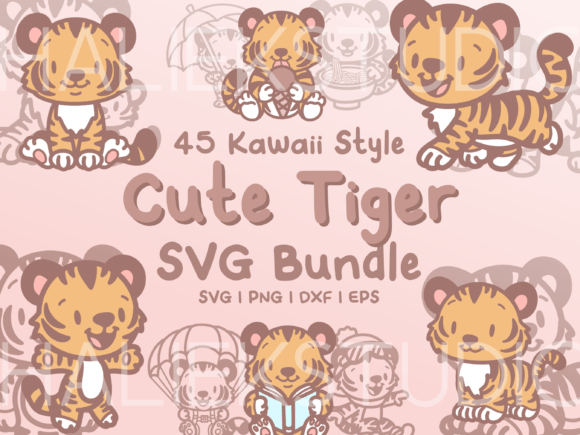
When I first opened the Tiger SVG Illustrations collection, I was immediately struck by how consistent the mood felt across all 45 files. This is a graphic design asset built around a clear personality: playful, gentle, and deliberately cute. The tigers are drawn in a kawaii style, each one doing something small and endearing — holding a coffee cup, waving, clutching a heart, sitting like a loaf, or peeking from behind a flower. There is no aggressive edge here. The visual tone is soft, friendly, and approachable, which immediately signals a specific kind of buyer. If you sell on Etsy, Creative Fabrica, or through print-on-demand platforms, you already know that niche appeal drives conversions. This collection could be a strong fit for a children’s themed shop, a planner brand, a sticker business, or a small creative studio building a consistent product line around gentle animal motifs.
First Impressions and Visual Personality
The entire set is delivered as black, single-layer line drawings. There are no gradients, no shading, and no color fills inside the files themselves. The full-color previews in the listing slides are there to show you what is possible, but the actual delivered files are clean outlines. That is an important detail to absorb early. For a digital product creator, this means you are getting a versatile base, not a finished colorful illustration. You are expected to add your own color, texture, or background treatment. Some sellers will see this as a limitation. I see it as a strength if you want to maintain brand consistency across multiple products. Because the line art is uniform, you can apply your own color palette and keep everything cohesive across mugs, shirts, stickers, and wall art.
The kawaii style is clearly aimed at buyers who respond to cute, low-stress design. Think of a mother looking for nursery decor, a teacher decorating a classroom, or a young adult building a cozy bullet journal. The tigers are not fierce or majestic in the traditional sense. They are squishy, cheerful, and slightly cartoonish. This makes the collection highly suitable for handmade business branding, small business branding, and social media content that needs to feel warm and inviting. If your shop already leans toward whimsical, feminine, or modern-cute aesthetics, this set will blend in naturally.
Real Product Testing for an Etsy Collection
Let me walk through a realistic scenario. Imagine you are preparing a new seasonal drop for your Etsy shop. You want to release a small bundle of tiger-themed printable products for back-to-school or early autumn. You download these SVG illustrations and begin testing them against your existing product templates. The first thing you notice is how clean the lines are. Because they are single-layer, they import smoothly into Canva templates, Cricut Design Space, and Silhouette Studio. There is no hidden layering that will break your workflow. You place a tiger onto a mug mockup, and it scales well. You try it on a tote bag preview, and the proportions hold. You test it as a small sticker design, and the cut lines are simple enough that a Cricut machine can handle them without excessive weeding.
From a business perspective, this is a commercial design asset that can support multiple product formats. You are not locked into one use case. The 45 illustrations give you enough variety to create a themed bundle without repeating the same pose. You could assemble a design bundle that includes a t-shirt graphic, a mug design, a set of planner stickers, a printable art print, and a social media template — all using different tigers from the same collection. That kind of visual hierarchy and consistency helps build customer trust. Buyers see a cohesive shop and are more likely to purchase multiple items.
Where This Asset Shines in Product Creation
After testing across several product types, I found that Tiger SVG Illustrations performs best in categories where the line art can remain the hero. Here are the areas where it truly stands out:
- Printable wall art — The black line drawings look clean on white or cream backgrounds. Add a soft color wash behind the tiger, and you have a nursery print or a child’s room decor piece. The kawaii style fits especially well in square or A4 format.
- Planner stickers and journaling kits — Because the drawings are simple, they shrink down well. You can offer a digital sticker sheet with multiple tiger poses. The single-layer design means they are easy to cut with a Cricut project or a Silhouette machine.
- T-shirt designs and apparel graphics — The black line art works on light-colored garments without needing a heavy underbase. For darker shirts, you can invert the design or add a white outline. The kawaii tigers appeal to a younger demographic and to adults who appreciate playful, minimalist style.
- Mug designs and drinkware — A single tiger hugging a coffee cup printed on a white mug is a quick sell. The simple lines transfer well to ceramic and stainless steel surfaces. You can also use the designs for tumbler wraps when paired with a solid color background.
- Greeting cards and invitation templates — The tigers doing cute things, like holding a balloon or a gift box, translate naturally into birthday cards, thank you notes, or baby shower invitations. Add a handwritten or script font, and you have a finished product.
Where to Use These Illustrations with Caution
Not every product format is a perfect match for this set. As a seller, you need to test carefully before publishing. Here are the areas where I recommend proceeding with caution:
- Tiny sticker details — Although the line art is clean, some of the tiger poses have small features like eyes, whiskers, or tiny paws. If you shrink the design too much for a small sticker, those details can become muddy or hard to cut. I suggest testing at your target size before committing to a production run.
- Overly complex layouts — Because the illustrations are single-layer black lines, they can get lost in busy backgrounds or crowded compositions. If you layer them over patterned paper or heavy textures, the line art may lose contrast. Stick to solid, light backgrounds or add a subtle white stroke behind the tiger to separate it from the background.
- Low-resolution print products — The SVG files are vector-based, so resolution is not an issue at the source. However, if you export them as PNGs for a sublimation design, make sure you export at 300 DPI. A low-resolution PNG will make the thin lines appear jagged, which hurts the perceived quality of your product.
- Dark backgrounds — The black line art is invisible on a black background. If you want to offer dark-themed products, you will need to recolor the lines to white or a light color. That is easy to do in vector software, but it is an extra step. Make sure your workflow accounts for that.
- Text-heavy templates — If you are designing a product that relies heavily on typography, like a motivational poster or a quote card, the tiger illustration should not compete with the text. Use the tiger as a secondary accent rather than the main focal point, or choose a simpler pose that leaves room for type.
Practical Seller Notes Before You Publish
Before you upload anything to your shop, run through this checklist. I have learned the hard way that skipping these steps leads to returns and negative reviews.
- Test on real mockups. Download a mug mockup, a t-shirt mockup, and a sticker mockup. Place the tiger illustration onto each one. Look at how the line weight reads at different sizes. If the lines look too thin or too thick, adjust accordingly.
- Preview it as a marketplace thumbnail. Your Etsy or Creative Fabrica listing thumbnail is the first thing a buyer sees. Shrink the tiger design down to thumbnail size. Can you still see the expression and the pose? If the detail is lost, choose a different tiger from the collection or simplify the composition.
- Check contrast on white and dark backgrounds. The black line art is high contrast on white, but on a dark background, it disappears. If you plan to offer dark-mode products, you must recolor the lines. Test this early.
- Test print colors if you are adding color. Because the delivered files are black line art, you will be adding your own fills. Print a test sample on your home printer or through a local print shop. Make sure the colors you choose do not clash with the line art. Pastel tones work well with the kawaii style.
- Verify PNG transparency. If you are exporting PNGs for a digital download or a Canva template, check that the background is truly transparent. A white halo around the tiger will ruin the professional look.
- Inspect SVG cut quality. For Cricut and Silhouette users, the single-layer design is a plus. But test a cut on a small scale. Some complex curves may need minor cleanup. Open the SVG in your cutting software and check for open paths or overlapping nodes.
- Organize files clearly for customers. If you are reselling the designs as part of a bundle, name the files clearly. Use descriptive names like "tiger-coffee.svg" or "tiger-waving.svg" so customers can find what they need. A messy file structure creates a bad customer experience.
- Pair it with the right font. When you add text to your product, choose a font that matches the kawaii mood. A serif font can feel too formal. A sans serif font works for a clean, modern look. A script font or handwritten font adds warmth. A display font with rounded edges complements the tiger style best. Test several combinations before settling on one.
- Confirm commercial licensing. Before you sell any finished product using these illustrations, read the license terms carefully. Most graphic design assets in this category allow you to sell physical and digital products, but they may limit how you can resell the raw files. Respect the creator’s terms and keep your shop compliant.
Supporting a Professional Product Collection
One of the strongest advantages of Tiger SVG Illustrations is how it can elevate your entire shop’s visual identity. When you use the same design asset across multiple product types, you create a sense of brand identity and reliability. A buyer who purchases a tiger sticker today may come back next week for a tiger mug, because they recognize the style and trust the quality. That kind of repeat business is the foundation of a sustainable shop.
For print-on-demand sellers, this collection offers a low-risk way to test a new theme. You can upload a few tiger designs to your Printful or Printify store without holding inventory. If the designs perform well, you can expand the line. If they do not, you have not wasted money on bulk printing. The SVG format also makes it easy to tweak sizes and placements for different products.
For digital download sellers, the 45 illustrations give you enough content to build a substantial product. You could create a clip art bundle with all the tigers, plus a few bonus elements like hearts, stars, or speech bubbles. You could also offer a sublimation design pack with pre-colored versions for apparel. The single-layer line art is a blank canvas, and your creativity is the only limit.
Final Thoughts on Commercial Use
If you are a creative entrepreneur looking for a reliable, cute, and commercially flexible SVG design set, this collection is worth your attention. It is not a complete product out of the box. You will need to add color, format it for your chosen platform, and test it on real products. But the foundation is strong. The 45 illustrations are diverse enough to support a themed collection, and the kawaii style has a proven audience on Etsy, Creative Fabrica, and social media.
I have tested these tigers across mugs, shirts, stickers, wall art, and social media templates, and they hold up well in most contexts. The few areas where they struggle — tiny details, dark backgrounds, and crowded layouts — are easy to work around once you know they exist. Every graphic design asset has its strengths and its limits. The key is to understand both before you invest time in product creation.
For a digital product creator who values consistency, niche appeal, and commercial flexibility, Tiger SVG Illustrations is a solid addition to your design toolkit. Use it to build a cohesive product line, test new markets, and give your customers something that feels both personal and professional. With proper testing and thoughtful presentation, these kawaii tigers can become a reliable part of your shop’s identity.